May 12
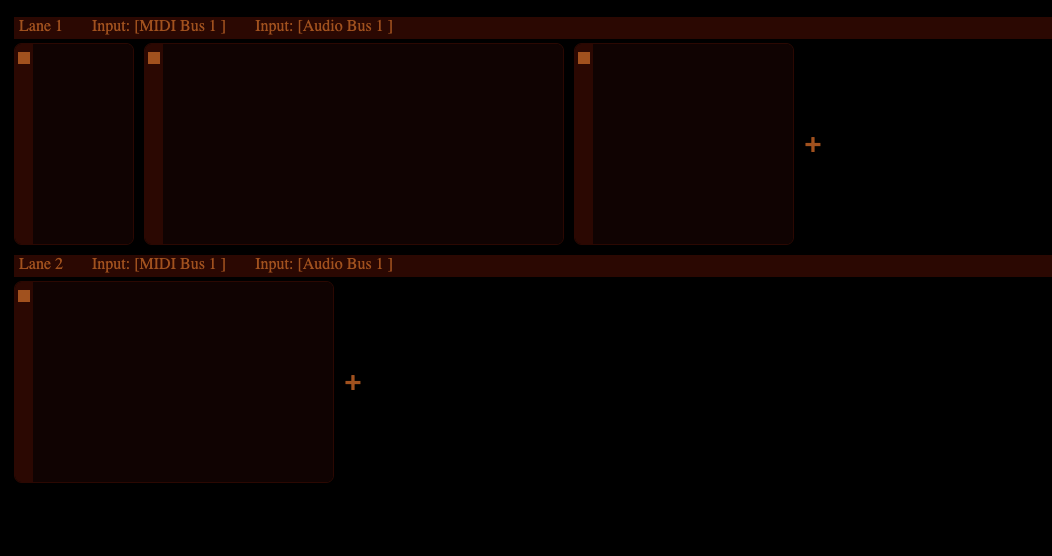
Make lane headers horizontal and place them above lanes
[dendy](https://forum.audiob.us/profile/dendy) had a great UI suggestion for this on the Audiobus Forum, full details [here](https://forum.audiob.us/discussion/comment/1205135#Comment_1…):
> this takes unnecessary too much space.. what i would do:
> make small horizonral stripe which whill mark top of lane
> those settings i wouls put into this line, alignwd to left,like:
> [lane name] [input] [output]
> this lane “top header” would be no scrollable, sceollable will be just modules bellow it
> all modules aligned to left (not centered in middle like on that screenshot)
(a mockup image is attached)
This will work well as I planning to add lane naming, collapse-expanding, bypassing etc. So, this will naturally work well.
Also, as part of this change, I need to enhance the feel lane separation / hierarchical feel, consider different module backgrounds and make sure all changes play along nicely.
The "top header" may still need to be scrollable when the user is using iPhone in portrait mode or when the plug-in window is not wide enough. Alternatively, it could become double-triple in height to fit all elements for those cases. All this stuff needs some experimenting.
# Improve visual cues for Lanes (old title of the issues)
From the Mela 4 discussion on the Audiobus forum it became clear that not everyone has used Ableton/Bitwig/PhasePlant and for them a concept of modules arranged on lanes looks and feels unfamiliar. Post: https://forum.audiob.us/discussion/comment/1200155#Comment_1…
One idea is to increase visual cues, making lanes look clearer, otherwise it may appear random arrangement of modules on a grid to some users.
Another thing, probably a note to myself to try to keep this in mind when designing / improving UI of Mela, that the concept of Modules on lanes should be introduced to users in a way that they don't feel overwhelmed.
Completed
Released in Mela 4.3 update.